HelpYour bots
Voice and calls
You can speak to your bots instead of typing, and talk to one live in a call. Every plan includes voice minutes each month.
Set up voice
There's nothing to set up: voice works as soon as you have a plan. Each plan includes voice minutes every month: 20 on Starter, 80 on Plus, 200 on Pro and 400 on Business. Calls count minute for minute, and a dictated minute counts as a tenth of one. The minutes come back on the 1st of the month.
To keep talking after the month's minutes run out, or to use voice without counting against them, add an OpenAI API key of your own:
- Create an API key at platform.openai.com.
- Open Settings → Voice, paste it into OpenAI API key, and choose Save.
OpenAI bills voice to that API account. A ChatGPT subscription doesn't cover it, even if your bots use ChatGPT for thinking.
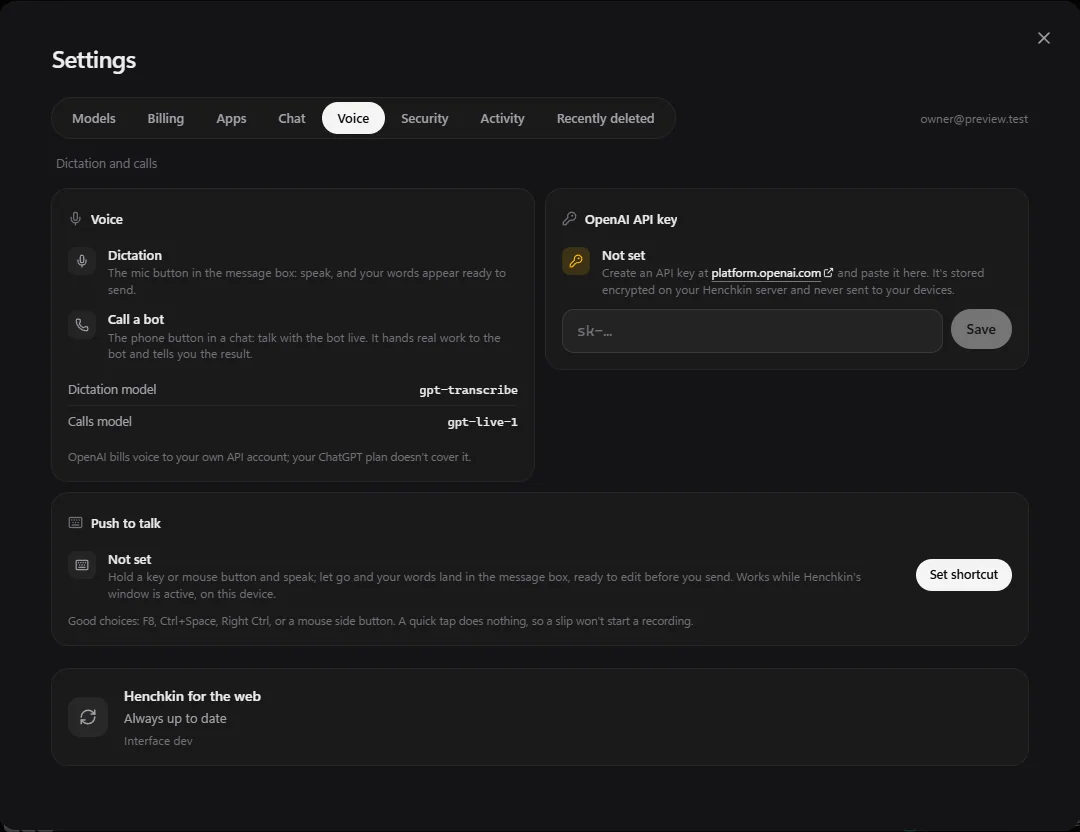
Dictation
Choose the microphone in the message box, speak, and your words appear ready to send. You can fix anything before sending.
Push to talk
On a computer, choose Set shortcut under Push to talk and press a key or mouse button (F8, Ctrl + Space, Right Ctrl or a mouse side button work well). Hold it and talk; let go and your words land in the message box. It works while Henchkin's window is active.
Call a bot
Choose the phone button at the top of a chat, or the round call button when the message box is empty. You talk with the bot live, the way you would on a phone call.
When a bot calls you
Ask a bot to call you ("call me when the report is ready"), or put it in a routine. When it calls, every device you're signed in on rings with Answer and Decline. It rings for a minute, and the same bot can't ring again for two minutes. Bots only call when you've asked them to.
Still stuck? Open Support from your account menu in the app, or email hello@henchkin.com. We usually reply within a day.