HelpApps and logins
Companies
Companies keep different parts of your work apart. Each company has its own bots, connected apps and passwords, so a bot for one client never sees another client's accounts.
What a company keeps apart
- Separate: bots, connected apps and saved passwords.
- Shared across your companies: your AI connections and your computers.
Every plan has unlimited companies.
Switch, add and manage
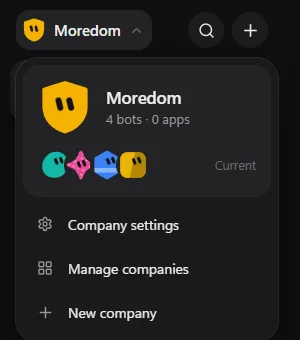
Choose the company name at the top left to open the company menu.
- New company: give it a name, colour and shape.
- Company settings: rename it, change its look, or choose whether its bots can talk to each other.
- Manage companies: see them all, and move bots from one company to another.
A dot on the company name means a bot in another company needs you.
Delete a company
First move or delete its bots. Then, in Manage companies, delete it and type its name to confirm. Its connected apps and saved passwords go with it, and can be restored from Settings → Recently deleted for 30 days.
Still stuck? Open Support from your account menu in the app, or email hello@henchkin.com. We usually reply within a day.